



0 ratings
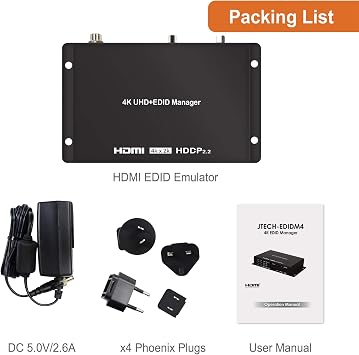
J-Tech Digital EDID Emulator 4K 60Hz 4:4:4 18Gbps w/4 EDID Functions: Read, Write, Emulation and Bypass; Supports OSD Manual, HDCP Indicator, CEC Pass-Through, and PC Management Tool
Easily Resolve EDID-Related Issues with the JTECH-EDIDM4 4K@60Hz HDMI EDID Emulator/Manager.
J-Tech Digital EDID Emulator 4K 60Hz 4:4:4 18Gbps w/4 EDID Functions: Read, Write, Emulation and Bypass; Supports OSD Manual, HDCP Indicator, CEC Pass-Through, and PC Management Tool
Item #: 85698009

J-Tech Digital EDID Emulator 4K 60Hz 4:4:4 18Gbps w/4 EDID Functions: Read, Write, Emulation and Bypass; Supports OSD Manual, HDCP Indicator, CEC

Item #: 85698009
0 ratings Write a review
Out of stock
us Imported from USA store
Our Top Logistics Partners
  • fedex
  • dhl
Easily Resolve EDID-Related Issues with the JTECH-EDIDM4 4K@60Hz HDMI EDID Emulator/Manager.
U-Care Warranty:
None
Select a Plan
fast shipping

Fast
Shipping

free return

Free
Return*

secure packaging

Secure Packaging

100% original products

100% Original Products

pci-dss

PCI DSS Compliance

iso certified

ISO 27001 Certified


paypal payment
visa payment
mastercard payment
Note: Step Down Voltage Transformer required for using electronics products of US store (110-120). Recommended power converters Buy Now.

What Stands Out

High Resolution
Supports 4K at 60Hz with 4:4:4 chroma, ensuring exceptional image quality for detailed displays in gaming and professional video editing.
Multiple Functions
Offers four versatile EDID functions: read, write, emulation, and bypass, enabling users to tailor their display setups according to specific needs and preferences.
User-Friendly Interface
Incorporates OSD manual and a PC management tool, simplifying navigation and configuration, alongside HDCP indicator and CEC pass-through for seamless operation.

Product Details

Shop J-Tech Digital EDID Emulator 4K 60Hz 4:4:4 18Gbps w/4 EDID Functions: Read, Write, Emulation and Bypass; Supports OSD Manual, HDCP Indicator, CEC Pass-Through, and PC Management Tool online at a best price in Uruguay. B086H83XTW
Product Dimensions (L x W x H)4.3 x 0.9 x 2.9 inches (10.9 x 2.3 x 7.4 cm)
Item Weight9.5 ounces (269.33 grams)
Item model numberJTECH-EDIDM4
Date First AvailableMarch 27, 2020
ManufacturerJ-Tech Digital

Who Should Buy?

Suitable For
  • AV Professionals

    Ideal for audio-visual professionals managing multiple displays and ensuring proper EDID communication for optimal performance.

  • Home Theater Enthusiasts

    Perfect for users wanting to maximize their 4K setup's capabilities, ensuring compatibility with various devices without issues.

  • Technical Users

    Beneficial for IT specialists who need detailed EDID management and complex configurations for diverse hardware environments.

Not Suitable For
  • Casual Users

    Not suitable for users with basic setups who may find the advanced features unnecessary or overly complicated.

Product Description

Have any Query? Chat with us

Customer Questions & Answers

  • Question: What is the main purpose of the J-Tech Digital EDID Emulator?

    Answer: The J-Tech Digital EDID Emulator primarily serves to manage Extended Display Identification Data (EDID). It allows devices like computers, projectors, and displays to communicate effectively. This process can prevent resolution issues and ensure the correct display of audio and video. For example, if a computer struggles to identify a monitor's capabilities, this emulator can help establish a stable connection, optimizing the viewing experience.
  • Question: How does the J-Tech Digital EDID Emulator support 4K resolution?

    Answer: This EDID Emulator supports 4K resolution at 60Hz and a color depth of 4:4:4, enabling high-definition video signals to be transmitted without compression. This capability is crucial for users who require high-quality visuals for gaming, graphic design, or professional video editing. The high bandwidth of 18Gbps ensures that even richly detailed content is displayed smoothly, avoiding lag or distortion.
  • Question: What does the 'Read' and 'Write' function in the emulator do?

    Answer: The 'Read' function captures the EDID data from a connected display, while the 'Write' function allows users to apply specific EDID parameters to other devices. This feature is beneficial in scenarios where consistent video output is needed across multiple devices, such as in setups for presentations or digital signage. By customizing EDID settings, users can mitigate compatibility issues.
  • Question: Can I use this emulator for gaming setups?

    Answer: Yes, the J-Tech Digital EDID Emulator is an excellent choice for gaming setups, particularly for high-end gaming rigs needing to maintain high resolutions. Its support for 4K at 60Hz ensures that gamers can enjoy stunning visuals without disruption. Additionally, it helps to eliminate common issues like screen flickering or no signal, maintaining a seamless gaming experience.
  • Question: What are the OSD Manual and HDCP indicators for?

    Answer: The OSD Manual refers to the On-Screen Display interface, allowing users to adjust settings directly through their display. The HDCP Indicator shows whether the emulator is successfully engaging with HDCP-compliant devices, crucial for streaming protected content. This simplicity and functionality support users in troubleshooting any connection issues, ensuring a smooth setup process.
  • Question: What are the benefits of using the Bypass function?

    Answer: The Bypass function allows users to connect devices without the emulator interfering with the EDID data, particularly useful for systems that require direct communication between the source and the display. This configuration comes in handy during multi-device setups, including live events or complex AV installations where maintaining direct input/output paths can optimize performance.
  • Question: How can I utilize the CEC (Consumer Electronics Control) function?

    Answer: The CEC function enables control of multiple HDMI devices using a single remote, streamlining user experiences significantly. For instance, when connected to a smart TV and a Blu-ray player, users can navigate menus and switch inputs without needing individual remotes. This centralized control is perfect for home theater installations, enhancing convenience while using multiple devices.
  • Question: Is this product suitable for professional video editing?

    Answer: Absolutely! The J-Tech Digital EDID Emulator is well-suited for professional video editing environments due to its high-resolution support and reliable EDID communication. Filmmakers and video editors can ensure that their editing monitors display accurate colors and resolutions, which is essential for color grading and final productions. This reliability significantly improves workflow efficiency.
  • Question: What is the significance of having multiple EDID functions?

    Answer: Having multiple EDID functions, such as Read, Write, Emulation, and Bypass, provides users with versatility in managing how devices communicate with displays. This feature is significant for tech professionals or enthusiasts who frequently work with various configurations, allowing them to troubleshoot quickly and optimize setups for different scenarios with minimal hassle.
  • Question: Where can I buy the J-Tech Digital EDID Emulator in Uruguay?

    Answer: You can purchase the J-Tech Digital EDID Emulator from Ubuy, which offers a reliable platform for finding this product in Uruguay. Ubuy provides a user-friendly shopping experience and a wide selection of electronic accessories, ensuring you can find exactly what you need without any complications.

J-Tech Digital Splitters JTECH-EDIDM4 Editorial Review

No editorial reviews found

Customer Reviews & Ratings

1 customers ratings
  • 5 Star
    100%
  • 4 Star
    0%
  • 3 Star
    0%
  • 2 Star
    0%
  • 1 Star
    0%

Review this product

Share your thoughts with other customers

Platform Trust & Buyer Confidence

trustpilot logo
4.2/5 9477 reviews
Read reviews
JK
Jasmin
Verified buyer

“Great products and very good service: very easy and very fast international delivery.”

9 September 2026 · via Trustpilot
AG
Anke
Verified buyer

“Wonderful online shopping experience, smooth transaction from the start. Payment method works conveniently and delivery is unexpectedly fast and reliable. You go the extra mile for service. What makes this even more amazing, you deliver to Namibia. I will remain a happy Ubuy customer and will increase my purchases for sure! Thank you!”

10 September 2026 · via Trustpilot
H
Hazel
Verified buyer

“Very easy to find the products what you need, and so fast delivery, that’s why I highly recommended to others costumers to used ubuy.”

10 September 2026 · via Trustpilot
O
Opaleye
Verified buyer

“I received exactly what I ordered I was skeptical about your site because that was my first time to order. But the order came timely and neatly packaged. I was not disappointed. Thank you.”

11 September 2026 · via Trustpilot
AC
Adele
Verified buyer

“Easy to find and order what you want on the website. Delivery is quick to the UK”

8 September 2026 · via Trustpilot
Secure Checkout Global Delivery Easy Returns Genuine Products

Important information

  • Limitations : For products shipped internationally, please note that any manufacturer warranty may not be valid; manufacturer service options may not be available; product manuals, instructions, and safety warnings may not be in destination country languages; the products (and accompanying materials) may not be designed in accordance with destination country standards, specifications, and labeling requirements; and the products may not conform to destination country voltage and other electrical standards (requiring use of an adapter or converter if appropriate). The recipient is responsible for assuring that the product can be lawfully imported to the destination country. When ordering from Ubuy or its affiliates, the recipient is the importer of record and must comply with all laws and regulations of the destination country.
  • Not all the products listed on Ubuy are for sale, as Ubuy is a global search engine. Products are subject to export/trade regulations.