- Home Page /
- Electronics /
- Camera /
- Printers & Scanners /
- Portable Photo Printers /
- Mini Photo Printer - Portable Pocket Sticker ...
0 ratings





Item #:
109711004
Mini Photo Printer - Portable Pocket Sticker Printers for iPhone Thermal Printer with 10 Rolls Thermal Paper for Photo, Memo, Journal - Black
85% of respondents would recommend this to a friend
Item #:
109711004
UYU 1526
Price Details
Excluding Shipping & Custom charges ( Shipping and custom charges will be calculated on checkout )
*All items will import from US
In stock
 Imported from USA store
QTY:
Order now and get it around Thursday, September 24
Secured transaction
Ubuy works hard to protect your security and privacy. Our advanced payment security system ensures confidentiality by encrypting your information during transmission using AES (Advanced Encryption Standards) and SSL (Secure Socket Layer) protocols. Your payment details are 100% secure as we do not share your payment details with third party sellers.
Our Top Logistics Partners


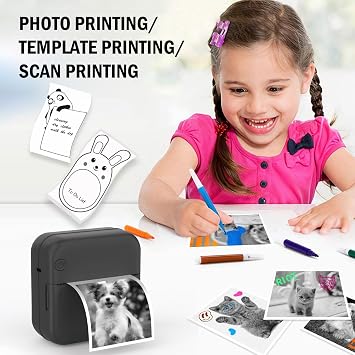
Perfect for printing everything from black and white photos to shopping lists and study notes, this pink mini photo printer will be loved by girls of all ages!

Fast
Shipping

Free
Return*

Secure Packaging

100% Original Products

PCI DSS Compliance

ISO 27001 Certified



Note: Step Down Voltage Transformer required for using electronics products of US store (110-120). Recommended power converters Buy Now.


What Stands Out
Compact Design
This portable mini photo printer easily fits in your pocket, making it ideal for on-the-go printing and capturing memories anytime, anywhere.
Thermal Technology
Utilizing advanced thermal printing, it produces vibrant sticker prints without messy ink, ensuring hassle-free usage and high-quality photos.
Versatile Use
Includes 10 rolls of thermal paper, perfect for everything from photo prints to journaling, allowing users to personalize their creativity effortlessly.
Product Details
| Printer Type | Thermal |
| Other Special Features of the Product | Portable |
| Printer Output Type | Monochrome |
| Item Weight | 5.3 ounces (150.26 grams) |
| Item Dimensions D x W x H | 1.5"D x 3"W x 3"H (3.8 x 7.6 x 7.6 cm) |
| Controller Type | iOS |
| Print media | Labels |
| Scanner Type | Photo |
| Maximum Copy Speed Black and White | 1 pages_per_minute |
| Compatible Devices | Smartphones |
| Ink Color | Black |
| Additional Printer Functions | Print Only |
| Control Method | App |
| Number of Trays | 1 |
| Processor Count | 1 |
| Resolution | 200 x 200 dpi |
| Color | Black |
| Color Depth | 1 bits_per_pixel |
| Maximum print Resolution Color | 200 |
| Maximum Print Resolution Black and White | 200 dpi or lower |
| Duplex | Simplex |
| Brand | HUIJUTCHEN |
| Model Name | Print7 |
| Model Number | 1 |
| Built-In Media | Mini thermal printer *1, Thermal printer *10, User Manual *1 |
| Model Series | C15 |
| Specific Uses For Product | labels, journals, notes, barcodes, QR codes, receipts, shopping/to-do lists, work plans, organizing, learning materials, kids' activities, blank templates, coloring |
| Manufacturer | HUIJUTCHEN |
| Color Pages per Minute | 2 |
| B&W Pages per Minute | 20 |
| Maximum Media Size | 25*57 cm |
| Maximum Sheet Capacity | 50 |
| Paper Size | 25*57 centimeters |
| Output sheet capacity | 50 |
| Printer Connectivity Type | Bluetooth |
| Hardware Interface | Bluetooth |
| Maximum Copy Resolution Black and White | 200 dpi |
| Connectivity Technology | Bluetooth |
| Printing Technology | Thermal |
| Special Feature | Portable |
| Printer Output | Monochrome |
| Maximum Print Speed (Color) | 2 |
| Max Printspeed Monochrome | 20 |
What's in the box
Mini thermal printer *1
Thermal printer *10
User Manual *1
Who Should Buy?

-
Creative Crafters
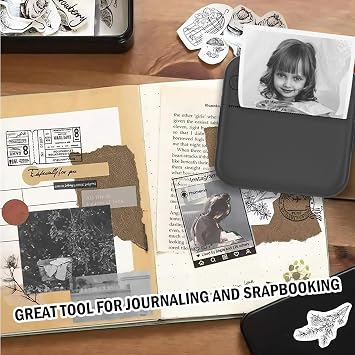
Ideal for scrapbook enthusiasts wanting to print and embellish their creative projects with instant stickers.
-
Students and Parents
Perfect for jotting down study notes or school memos, keeping organization fun and visually appealing.
-
Event Planners
Handy for creating personalized invitations and labels quickly for parties, weddings, and social events.

-
Professional Photographers
Lacks high-quality print resolution needed for professional photography or detailed images.
Product Description
Have any Query? Chat with us
Customer Questions & Answers
-
Question:
What is a Mini Sticker Printer and how does it work?
Answer: The Mini Sticker Printer is a compact, portable thermal printer designed to print stickers and labels directly from your iPhone. It uses thermal printing technology, which means it doesn’t require ink—only thermal paper. To use it, simply connect your iPhone via Bluetooth, select the images or designs you wish to print, and the printer produces vibrant, smudge-proof stickers in seconds. This versatile gadget is perfect for journaling, creating custom labels, or printing photos on the go. -
Question:
What types of paper does the Mini Sticker Printer support?
Answer: The Mini Sticker Printer comes with 10 rolls of thermal paper included, which are specifically designed for sticker printing. These papers are adhesive-backed, allowing for easy application to notebooks, planners, and various surfaces. As thermal paper is heat-activated, you don’t need to worry about ink smudging or running out, making it a convenient option for quick and creative projects that require durable labeling or fun decorations. -
Question:
Can I use the Mini Sticker Printer without an app?
Answer: No, the Mini Sticker Printer requires a compatible app to function. You can download the dedicated app on your iPhone to access various design features, templates, and editing tools. This app enables you to customize your prints, add text, and choose different layouts effortlessly. The integration with Bluetooth technology ensures a seamless connection between your device and the printer, making the entire process user-friendly and enjoyable. -
Question:
What are some creative uses for the Mini Sticker Printer?
Answer: The Mini Sticker Printer is perfect for a variety of creative applications. Users frequently utilize it for personal journaling by printing decorative stickers and headings. It can enhance scrapbooking projects, offer personalized labels for organizing items at home, or create fun photo stickers for parties and events. Additionally, businesses can utilize it for labeling products or packaging, thus combining utility with creativity in everyday tasks. -
Question:
Is the Mini Sticker Printer portable for travel?
Answer: Yes! The Mini Sticker Printer is designed with portability in mind. Its compact size allows it to easily fit into a bag or purse, making it an excellent companion for travel and events. Whether you’re documenting your adventures in a travel journal or setting up a fun photo booth at a celebration, this printer ensures that you can capture and share your memories on the spot, making it a great tool for crafters and creators alike. -
Question:
How do I connect my iPhone to the Mini Sticker Printer?
Answer: Connecting your iPhone to the Mini Sticker Printer is straightforward. First, ensure that the printer is charged. Next, download the compatible app from the App Store. Open the app, turn on Bluetooth on your iPhone, and select the Mini Sticker Printer from the list of available devices. Once connected, you’ll be able to send images to the printer and customize your prints with ease. This seamless connection allows for hassle-free printing experiences every time. -
Question:
What colors are available for the Mini Sticker Printer?
Answer: The Mini Sticker Printer is available in a vibrant yellow color, making it not only functional but also stylish. This eye-catching design adds a fun flair to your crafting supplies and makes it a great conversation starter during creative sessions. Additionally, the unique color allows it to stand out, ensuring you always find it quickly among your other tools or stationery. -
Question:
Does the Mini Sticker Printer support color printing?
Answer: The Mini Sticker Printer is designed to print monochrome designs, not full-color images. It can produce high-quality black and white prints, ideal for stickers, labels, and visual notes. While it may not support color printing, you can experiment with various designs and artistic layouts to make your prints striking and engaging. This limitation often encourages creativity in design, making each print unique and personal. -
Question:
How many prints can the Mini Sticker Printer produce with the included thermal paper?
Answer: The Mini Sticker Printer comes with 10 rolls of thermal paper. Each roll typically contains around 20-30 sheets of paper, depending on the specific type you are using. Therefore, you can anticipate producing anywhere from 200 to 300 prints, giving you plenty of opportunities to create custom designs, stickers, or labels for your various projects. This generous supply ensures that you can unleash your creativity without frequent interruptions. -
Question:
Where can I buy the Mini Sticker Printer?
Answer: You can purchase the Mini Sticker Printer - Mini Pocket Printer for iPhone from Ubuy in Uruguay. Ubuy is known for its diverse range of electronic products and offers a convenient shopping experience. With its user-friendly interface, you can easily find the printer along with its accessories. Ubuy is a reliable platform that ensures you receive quality products and a smooth shopping experience.
HUIJUTCHEN Portable Photo Printers 1 Editorial Review


No editorial reviews found
Customer Reviews & Ratings
961 customers ratings
-
5 Star
67%
-
4 Star
15%
-
3 Star
9%
-
2 Star
3%
-
1 Star
6%
Review this product
Share your thoughts with other customers
Platform Trust & Buyer Confidence

JK
Jasmin
Verified buyer
“Great products and very good service: very easy and very fast international delivery.”
9 September 2026 · via Trustpilot
AG
Anke
Verified buyer
“Wonderful online shopping experience, smooth transaction from the start. Payment method works conveniently and delivery is unexpectedly fast and reliable. You go the extra mile for service. What makes this even more amazing, you deliver to Namibia. I will remain a happy Ubuy customer and will increase my purchases for sure! Thank you!”
10 September 2026 · via Trustpilot
H
Hazel
Verified buyer
“Very easy to find the products what you need, and so fast delivery, that’s why I highly recommended to others costumers to used ubuy.”
10 September 2026 · via Trustpilot
O
Opaleye
Verified buyer
“I received exactly what I ordered I was skeptical about your site because that was my first time to order. But the order came timely and neatly packaged. I was not disappointed. Thank you.”
11 September 2026 · via Trustpilot
AC
Adele
Verified buyer
“Easy to find and order what you want on the website. Delivery is quick to the UK”
8 September 2026 · via Trustpilot
Secure Checkout
Global Delivery
Easy Returns
Genuine Products
Product Price History
Important information
- Limitations : For products shipped internationally, please note that any manufacturer warranty may not be valid; manufacturer service options may not be available; product manuals, instructions, and safety warnings may not be in destination country languages; the products (and accompanying materials) may not be designed in accordance with destination country standards, specifications, and labeling requirements; and the products may not conform to destination country voltage and other electrical standards (requiring use of an adapter or converter if appropriate). The recipient is responsible for assuring that the product can be lawfully imported to the destination country. When ordering from Ubuy or its affiliates, the recipient is the importer of record and must comply with all laws and regulations of the destination country.
- Not all the products listed on Ubuy are for sale, as Ubuy is a global search engine. Products are subject to export/trade regulations.
UYU 1526
Order now and get it around Thursday, September 24
This item is not restrict in my country.(Please click on above link if this item is not restrict in your country, So our team will review and allow.)
QTY:
Secured transaction
PCI DSS compliant and ISO 27001:2022 certified, with encrypted payments and full buyer protection on every order.
Our Top Logistics Partners
Fastest cross-border delivery
Features & Benefits
- Compact and portable design, easy to carry anywhere.
- Inkless technology for hassle-free printing.
- Compatible with both iOS and Android devices via Bluetooth.
- Comes with 10 rolls of thermal paper: 5 ordinary and 5 sticky paper.
- Includes a multifunctional app with diverse templates for various occasions.
- Great gift option for kids and busy parents alike.
Ubuy Assurance
Experience worry-free shopping with 100% original products, PCI DSS-compliant payment security, ISO 27001-certified data protection, the fastest cross-border delivery, free returns *, and secure packaging on every order.