- Página de inicio /
- Electrónica /
- Computer Accessories /
- Computer Accessories & Peripherals /
- Input Devices /
- Graphics Tablets /
- Wacom Cintiq Pro 22, Drawing Tablet with 4K 1...
0 ratings




Nº de artículo:
248169647
Wacom Cintiq Pro 22, Drawing Tablet with 4K 120 Hz Touchscreen & ProPen 3
86% of respondents would recommend this to a friend
Nº de artículo:
248169647
UYU 166755
Price Details
Excluding Shipping & Custom charges ( Shipping and custom charges will be calculated on checkout )
*All items will import from Estados Unidos
En stock
 Importado de la tienda USA
QTY:
Haz tu pedido ahora y recíbelo por ahí Viernes, Octubre 02
Secured transaction
Ubuy works hard to protect your security and privacy. Our advanced payment security system ensures confidentiality by encrypting your information during transmission using AES (Advanced Encryption Standards) and SSL (Secure Socket Layer) protocols. Your payment details are 100% secure as we do not share your payment details with third party sellers.
Our Top Logistics Partners


The Wacom Cintiq Pro 17 is designed and engineered for professionals to create a harmonious creative process between artists and their work.

Fast
Shipping

Free
Return*

Secure Packaging

100% Original Products

PCI DSS Compliance

ISO 27001 Certified



Note: Step Down Voltage Transformer required for using electronics products of Estados Unidos store (110-120). Recommended power converters Comprar ahora.


What Stands Out
High-Resolution Display
The 4K display offers stunning clarity and detail, allowing artists to see their work in exacting precision, enhancing creativity and reducing eye strain during long drawing sessions.
Smooth Touch Experience
A 120 Hz refresh rate ensures smooth interactions, making drawing and sketching feel effortless, capturing every stroke fluidly without lag, which enhances overall workflow efficiency.
Advanced ProPen 3
With 8192 levels of pressure sensitivity, ProPen 3 realizes intricate details and diverse techniques, empowering artists with precision control for a natural and responsive drawing experience.
Detalles de producto
| Brand | Wacom |
| Model Name | Wacom Cintiq Pro 22 |
| Built-In Media | Digital Pen, HDMI Cable, Pen Holder, Power Cord, USB Cable |
| Target Audience | Student, Teacher |
| Model Number | DTH227K0A |
| Number of Items | 1 |
| Manufacturer | Wacom Technology Corporation |
| UPC | 753218984258 |
| Item Highlight | Color-accurate display with advanced creative control for pros & studios creating animation, VFX, game art and 3D projects |
| Unit Count | 1 Count |
| Number of Packs | 1 |
| Mfr Part Number | DTH227K0A |
| Connectivity Technology | USB-C (DP alt mode) x1, USB-C x1, USB-A x1, HDMI x1, Mini DisplayPort x1 |
| Pressure Sensitivity | 8192 levels |
| Operating System | Windows, macOS |
| Additional Features | 10-point multi-touch |
| Specific Uses For Product | 3D Modelling, Animation, Designing |
| Compatible Devices | Desktop, Laptop |
| Display Type | LCD |
| Native Resolution | 3840x2160 |
| Screen Size | 21.5 inches |
| Item Weight | 11 pounds (4.99 kg) |
| Item Dimensions L x W | 20.3"L x 12.3"W (51.6 x 31.2 cm) |
| Active Surface Area | 18.7 x 10.5 |
| Color | Black |
| Special Feature | 10-point multi-touch |
What's in the box
Digital Pen
USB Cable
HDMI Cable
Pen Holder
Power Cord
Who Should Buy?

-
Professional Artists
Ideal for artists who require high precision and resolution for detailed illustrations and digital artwork.
-
Graphic Designers
Perfect for graphic designers needing advanced features for creating complex designs with accuracy and ease.
-
Animators
Great for animators who benefit from high responsiveness and touch screen capabilities for creating fluid animations.

-
Casual Doodlers
Not suitable for casual users who only need basic drawing tools and prefer cheaper alternatives.
DESCRIPCIÓN DEL PRODUCTO
¿Tienes alguna consulta? Chatea con nosotros
Preguntas y respuestas de los clientes
-
Pregunta:
What are the key features of the Wacom Cintiq Pro 17 drawing tablet?
Respuesta: The Wacom Cintiq Pro 17 showcases an impressive 4K touchscreen with a 120 Hz refresh rate, ensuring smooth and vibrant visuals. It comes equipped with the ProPen 3, offering 8,192 levels of pressure sensitivity for exceptional precision in your drawings. Additionally, the large 17-inch display provides ample space for creative tasks, whether you’re sketching, painting, or editing photos. This combination of features makes the tablet a favorite among professionals in digital art, design, and illustration. -
Pregunta:
Is the Wacom Cintiq Pro 17 compatible with various operating systems?
Respuesta: Yes, the Wacom Cintiq Pro 17 is compatible with major operating systems, including Windows, macOS, and many Linux distributions. This broad compatibility allows users to seamlessly integrate the tablet into their existing workflow, regardless of the software they prefer. Artists can use applications such as Adobe Photoshop, Illustrator, and CorelDRAW, maximizing the tablet's capabilities for any project. This versatility makes it an excellent choice for both creative professionals and hobbyists alike. -
Pregunta:
Can I use the Wacom Cintiq Pro 17 for animation work?
Respuesta: Absolutely, the Wacom Cintiq Pro 17 is ideal for animation work due to its high-resolution display and responsive ProPen 3 technology. The tablet allows animators to create intricate details with outstanding precision, making it easier to finalize drawings frame by frame. Its multi-touch capabilities enable effortless zooming, panning, and rotating of animations, providing a fluid experience when working on complex projects. This feature set makes it particularly suitable for animators looking to enhance their craft. -
Pregunta:
How does the ProPen 3 enhance the drawing experience on the Wacom Cintiq Pro 17?
Respuesta: The ProPen 3 is designed to provide an exceptional drawing experience with its 8,192 levels of pressure sensitivity and tilt recognition. This allows for varied brush strokes that can mimic traditional artistic tools, giving artists unparalleled control over their work. Moreover, the pen does not require batteries, ensuring that users can focus on their art without interruptions. Its ergonomic design means artists can work for extended periods without discomfort, making it perfect for detailed artwork and projects. -
Pregunta:
What creative applications work best with the Wacom Cintiq Pro 17?
Respuesta: The Wacom Cintiq Pro 17 is compatible with a multitude of creative applications, including Adobe Creative Suite (Photoshop, Illustrator, After Effects), Corel Painter, Clip Studio Paint, and more. Each program utilizes the tablet’s advanced pressure sensitivity and multi-touch features to enhance the user's artistic capabilities. For instance, Photoshop takes advantage of the tablet to offer lifelike brush strokes, while Clip Studio Paint is great for comic artists. This compatibility ensures that a wide range of creative professionals can benefit from its capabilities. -
Pregunta:
What makes the 4K display on the Wacom Cintiq Pro 17 stand out?
Respuesta: The 4K display on the Wacom Cintiq Pro 17 delivers stunning clarity and detail, with over 8 million pixels providing exceptional color accuracy and vivid imagery. This level of resolution allows artists to see their work in fine detail, making it easier to spot imperfections and make precise edits. The high-quality display is especially valuable for detailed illustrations and photo editing, where color fidelity and sharpness are crucial to achieving professional results. This feature significantly enhances the overall creative experience. -
Pregunta:
Is the Wacom Cintiq Pro 17 suitable for beginners?
Respuesta: Yes, while the Wacom Cintiq Pro 17 is a professional-grade tablet, it is also suitable for beginners who are serious about pursuing digital art. Its intuitive touch capabilities and responsive ProPen 3 make it easier for novices to practice their skills and develop their style. Additionally, the widespread use of this tablet in educational settings means that there are numerous resources and tutorials available to help beginners get started. As they progress, the Wacom Cintiq Pro 17 can scale with their developing skills. -
Pregunta:
How does the multi-touch feature enhance usability?
Respuesta: The multi-touch feature on the Wacom Cintiq Pro 17 enhances usability by allowing users to interact with their artwork using seamless gestures, mimicking the experience of using a touchscreen device. Pinch-to-zoom, rotate, and pan functionalities enable artists to navigate their projects fluidly, which is essential during intricate detailing. This enables a more natural interaction with their digital canvas and enhances workflow, permitting artists to focus on their creativity without distractions caused by complicated commands. -
Pregunta:
Can I customize the ExpressKeys on the Wacom Cintiq Pro 17?
Respuesta: Yes, the Wacom Cintiq Pro 17 comes with customizable ExpressKeys that offer users the ability to set shortcuts for their favorite tools and commands. This feature helps streamline the workflow by allowing artists to access essential functions without navigating menus. Whether it's a quick toggle of a brush or changing layers, having crucial commands at your fingertips means that creative processes can be much more efficient. Customization also means the tablet can cater to personal preferences, enhancing the overall drawing experience. -
Pregunta:
Where can I buy the Wacom Cintiq Pro 17 Drawing Tablet?
Respuesta: You can purchase the Wacom Cintiq Pro 17 drawing tablet from Ubuy in Uruguay. Ubuy provides a reliable platform for buying this highly sought-after tablet, ensuring you have access to the latest technology for your drawing and design needs. This makes it convenient for anyone looking to enhance their digital art capabilities with top-tier equipment.
Wacom Graphics Tablets DTH227K0A Editorial Review


No se encontraron reseñas editoriales
Customer Reviews & Ratings
61 valoraciones de los clientes
-
5 estrella
70%
-
4 estrella
7%
-
3 estrella
9%
-
2 estrella
6%
-
1 estrella
8%
Revisar este producto
Comparte tus ideas con otros clientes
Platform Trust & Buyer Confidence

JK
Jasmin
Verified buyer
“Great products and very good service: very easy and very fast international delivery.”
9 September 2026 · via Trustpilot
AG
Anke
Verified buyer
“Wonderful online shopping experience, smooth transaction from the start. Payment method works conveniently and delivery is unexpectedly fast and reliable. You go the extra mile for service. What makes this even more amazing, you deliver to Namibia. I will remain a happy Ubuy customer and will increase my purchases for sure! Thank you!”
10 September 2026 · via Trustpilot
H
Hazel
Verified buyer
“Very easy to find the products what you need, and so fast delivery, that’s why I highly recommended to others costumers to used ubuy.”
10 September 2026 · via Trustpilot
O
Opaleye
Verified buyer
“I received exactly what I ordered I was skeptical about your site because that was my first time to order. But the order came timely and neatly packaged. I was not disappointed. Thank you.”
11 September 2026 · via Trustpilot
AC
Adele
Verified buyer
“Easy to find and order what you want on the website. Delivery is quick to the UK”
8 September 2026 · via Trustpilot
Pago seguro
Global Delivery
Easy Returns
Genuine Products
Product Price History
Información importante
- Limitaciones: Para los productos enviados al extranjero, ten en cuenta que cualquier garantía del fabricante puede no ser válida; las opciones de servicio del fabricante pueden no estar disponibles; los manuales del producto, las instrucciones y las advertencias de seguridad pueden no estar en los idiomas del país de destino; los productos (y los materiales que los acompañan) pueden no estar diseñados de acuerdo con las normas, especificaciones y requisitos de etiquetado del país de destino; y los productos pueden no ajustarse al voltaje del país de destino y a otras normas eléctricas (lo que requiere el uso de un adaptador o convertidor, si procede). El destinatario es responsable de asegurarse de que el producto puede ser importado legalmente al país de destino. Cuando hagas un pedido a Ubuy o a sus filiales, el destinatario es el importador registrado y debe cumplir todas las leyes y normativas del país de destino.
- No todos los productos que aparecen en Ubuy están a la venta, ya que Ubuy es un motor de búsqueda a nivel mundial. Los productos están sujetos a las normas de exportación/comercio.
UYU 166755
Haz tu pedido ahora y recíbelo por ahí Viernes, Octubre 02
This item is not restrict in my country.(Please click on above link if this item is not restrict in your country, So our team will review and allow.)
QTY:
Secured transaction
PCI DSS compliant and ISO 27001:2022 certified, with encrypted payments and full buyer protection on every order.
Our Top Logistics Partners
Fastest cross-border delivery
características y beneficios
- Ultra HD 4K 17 display for vivid, real-life color representation.
- Highly sensitive Pro Pen 3 with 8,192 levels of pressure for precision.
- 10-point multi-touch support for an immersive creative experience.
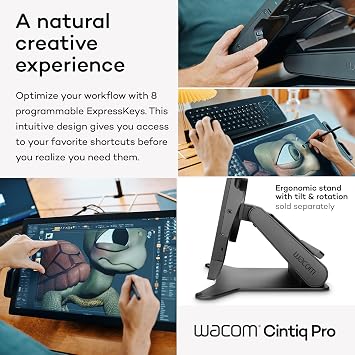
- Customizable ExpressKeys for quick access to favorite shortcuts.
- Pantone Validated colors ensure true-to-life skin tone accuracy.
- Ideal for professionals in graphic design, concept art, and photography.
Ubuy Assurance
Experience worry-free shopping with 100% original products, PCI DSS-compliant payment security, ISO 27001-certified data protection, the fastest cross-border delivery, free returns *, and secure packaging on every order.